Limited-Time 30% OFF!Get Offer
See the five parts

FLUX 3 Max prompt guide

Write a FLUX 3 Max prompt as one shot that plays out in order: who and where, what happens, how the camera moves, the light, and what we hear. This FLUX 3 Max prompt guide shows that structure on real prompts, then covers how to script lines and sound, how to pair a first and last frame, and what to change when a take comes back wrong.

Structure

How to write a FLUX 3 Max prompt in five parts

FLUX 3 Max reads a prompt as a shot that plays out over time. The prompts that work best set up a clear sequence of things the viewer can see, then say how the camera films it, what the light is like and what we hear.

Write the parts as plain sentences, with or without labels; the florist prompt further down labels its camera, light, line and sound. Use the order as a checklist, not a rule (the official bull-rider prompt opens with its camera move): get the action down first, then make sure camera, light and sound each have a sentence if you care how they turn out. The examples below are broken down by these five parts.

A 5-second draft can be short: one action, one camera instruction and one sound. Add beats as you raise the duration, and make each new sentence about something the viewer can see or hear.

Five parts, one shot

1Who or what, and where. 2What happens, in order. 3Shot size and camera move. 4Light and look. 5Speaker (tone): "line", then the sounds of the place.

  1. Scene — The subject and the place, with the one or two details that should stay the same for the whole clip. Give the place one motion of its own, such as steam, ripples, drifting snow or swaying laundry; it helps the clip look filmed rather than like a still image sliding.
  2. Action — The events in the order they happen, written as verbs. This is the part that moves the clip forward. Link the beats with words like “then” and “as”, so even a 5-second clip can have a beginning, a middle and an end. A comparison such as “her hair falls like a slow-motion waterfall” sets the pace in a few words.
  3. Camera — How close we are, and whether the camera holds, pushes in, pans or follows. Use one move by default. If you need two, such as rotating while moving down, give each move its own verb.
  4. Light and look — Time of day, where the light comes from, and the finish you want, such as film grain or a 1980s commercial look.
  5. Sound — Spoken lines in quotes after the speaker's name, then the sounds of the place, ideally three or four specific ones, such as ambience and effects, plus music or “no music”.
One take

FLUX 3 Max prompt examples: one shot, one camera move

Treat a FLUX 3 Max clip as one take of 5 to 20 seconds. Prompts that ask for a montage, several angles or a list of moods give the model nothing to play in order. Rewrite them as a single shot with events.

Weak prompt

“Cozy coffee shop, cinematic, barista making latte art, close-ups and wide shots, beautiful lighting, highly detailed.”

Rewritten as one 8-second shot

A barista with rolled sleeves stands behind a wooden counter in a small café. She pours steamed milk into a cup, draws a leaf in the foam, then slides the cup toward the camera and looks up with a small smile. One continuous shot: close on the cup at counter height, the camera slowly rising to her face as she looks up. Morning sun through the front window, warm haze, steam catching the light. Milk hissing in the pitcher, cups clinking, low café chatter, soft acoustic guitar in the background.

Mood words like cinematic and highly detailed don't tell the model what happens. Keep the look to one short sentence and spend the rest of the prompt on events.

What changed
Scene
A barista with rolled sleeves, behind a wooden counter in a small café
Action
Pours, draws a leaf, slides the cup, looks up: four beats in order
Camera
One move from the cup up to her face, in place of “close-ups and wide shots”
Light and look
A named source, morning sun through the window, in place of “beautiful lighting”
Sound
Three sounds from the room plus quiet music
Check the take for
  • One unbroken shot, with no cut to a wide angle
  • The pour, the leaf and the slide happening in that order
  • The sounds you named, not a different score

An official example, part by part

This text-to-video prompt comes from the official FLUX 3 Max examples. It is three sentences long and still covers four of the five parts.

Official example prompt

A red panda walks along a mossy log in a sunlit forest, pausing to sniff the air before climbing over a fallen branch. Soft morning light filters through the canopy. Ambient birdsong and rustling leaves.

What it covers
Scene (a red panda on a mossy log in a forest), three actions in order (walks, pauses to sniff, climbs over a branch), light (soft morning light through the canopy) and sound (birdsong, rustling leaves).
What you could add
A camera sentence, such as a slow tracking shot at log height, if you want to decide the framing yourself instead of leaving it to the model.
Watch for
The walk, the sniff and the climb in that order, and which framing the model picked when the prompt didn't name one.
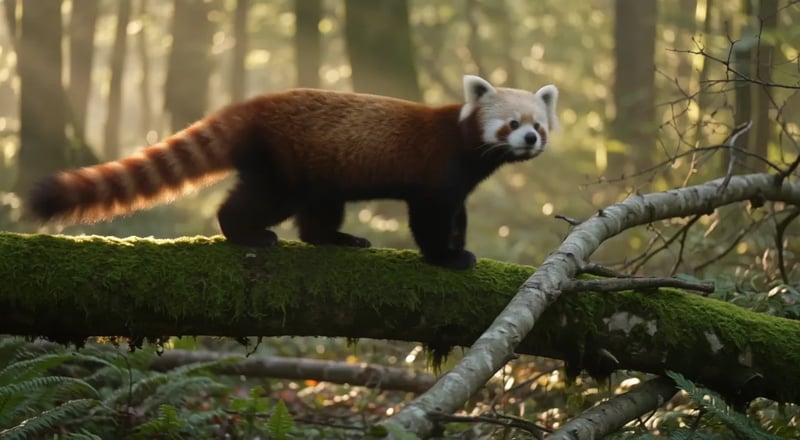
FLUX 3 Max text to video example: a red panda walks along a mossy log in a sunlit forest
Dialogue and sound

Script dialogue and sound in FLUX 3 Max

Unless you switch audio off, the sound comes out of the same run as the picture, so write the prompt like a short script: who speaks and in what tone, the line itself, then the sounds of what they do and of the place around them.

One spoken line in a labelled prompt

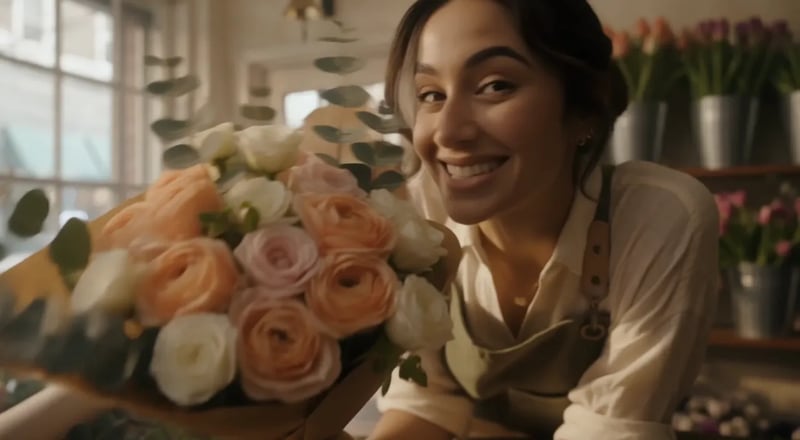
A 5-second, 720p text-to-video prompt written in the five parts, with the camera, light, line and sound labelled. The spoken line and the sound come last: one short line for the florist, then the sounds of her work and the shop.

Full prompt

A young florist trims the stems of a bouquet at a wooden counter, wraps it in brown paper and holds it out toward the camera. Camera: slow push-in from a medium shot to a close-up of her face and the flowers. Light: soft afternoon sun through the shop window, warm tones. Florist (smiling): "These ones last all week." Sound: scissors snipping, paper rustling, a quiet street outside, a small bell over the door.

How the line is written
Speaker first, the tone in brackets, the words in quotes. One short line leaves the 5 seconds room for the trimming and wrapping before it.
How the sound is layered
The sounds of what she does come first (scissors snipping, paper rustling), then the place around her (a quiet street, a small bell over the door).
Watch for
She wraps the bouquet and holds the roses out toward the lens as the camera pushes in, in the order the prompt lists them.
Listen for
The line after the wrap, scissors and paper before it, then the street and the bell, and no music, since none was asked for.
FLUX 3 Max text to video: a florist in a bright flower shop holds a bouquet of roses out toward the camera

Two characters, one line and a reaction

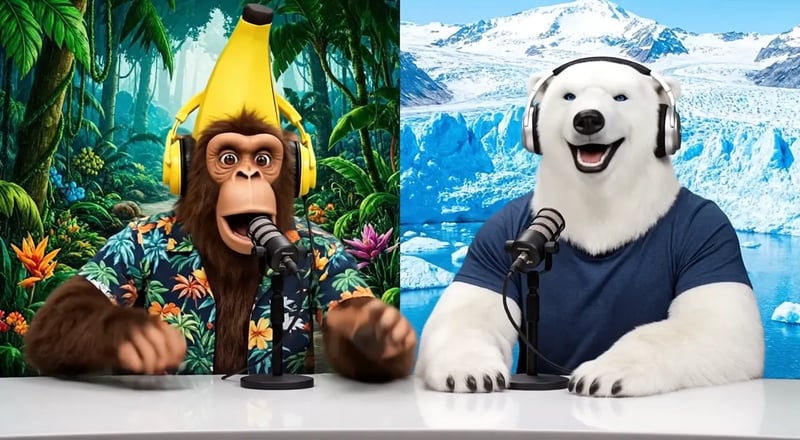
In this official image-to-video example, the still already shows two hosts at their desk, so the prompt only writes what they do and say next.

Official example prompt

The monkey leans into his microphone and says, "Welcome back to the show!" The polar bear laughs and nods along, tapping the desk. Jungle birdsong on the left, a cold wind on the right.

A line tied to an action
“Leans into his microphone and says” helps the model tell who speaks, which matters when two characters share the frame.
Sound for everyone in the shot
The second host gets a reaction you can hear, a laugh and a tap on the desk, and the prompt gives each side of the frame its own background sound.

Keep lines short. As a starting point, give one speaker one line in a 5-second clip and add lines only as you add seconds.

FLUX 3 Max image to video example: a monkey and a polar bear host a talk show at a desk
Image to video

First and last frame: start from a photo, end on a set picture

Your photo already fixes the look, so spend the prompt on the motion: who moves, what changes, and what the camera and light do. With a last frame, make the two stills match in angle and light so the clip has one clear change to make.

A closed box, then the open box

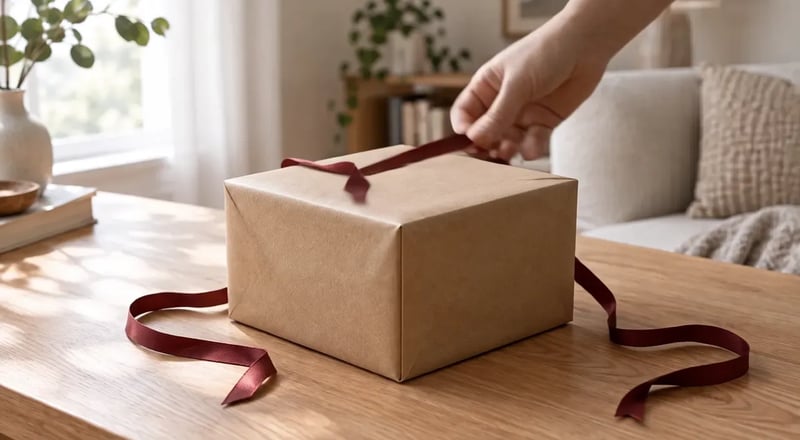
The first frame shows a closed kraft-paper gift box tied with a dark red ribbon on a light oak table. The last frame shows the same box from the same angle, open, with the lid leaning on its side, the ribbon loose on the table and a silver watch on white tissue paper. The prompt writes what the hand does, in order, and what you hear.

Full prompt

A hand enters the frame, unties the red ribbon and lifts the lid, leans it against the side of the box and moves out of frame, revealing a wristwatch on white tissue paper. The camera holds still. The soft window light stays the same. Sound: ribbon sliding, paper rustling, a soft click as the lid comes off.

What the prompt leaves out
The table, the room and the window light are already in the first frame. The prompt spends its words on the hand, the lid and the sound, and says the camera and the light stay as they are.
Point at what is already there
Refer to things in the picture with “the”, such as the ribbon or the lid, and say what happens to them. The still has already shown the model what they look like.
Make the two frames match
Both stills share the camera angle, the table and the light. Only the lid, the ribbon and what sits on the tissue paper differ, so the clip has one clear change to make.
The shape comes from the first frame
Image to video here has no aspect-ratio picker. Crop the first frame to the shape you need, such as 9:16, 1:1 or 16:9, before you upload it, and give the last frame the same shape.
Watch for
A hand comes in, pulls the ribbon loose and lifts the lid, and the clip ends on the open box as it looks in the last frame.
FLUX 3 Max image to video with a first and last frame: a hand unties a gift box on an oak table and lifts the lid to show a watch
First frame: a closed kraft-paper gift box tied with a dark red ribbon on a light oak table
First frame

One frame, a slow move and a voice-over

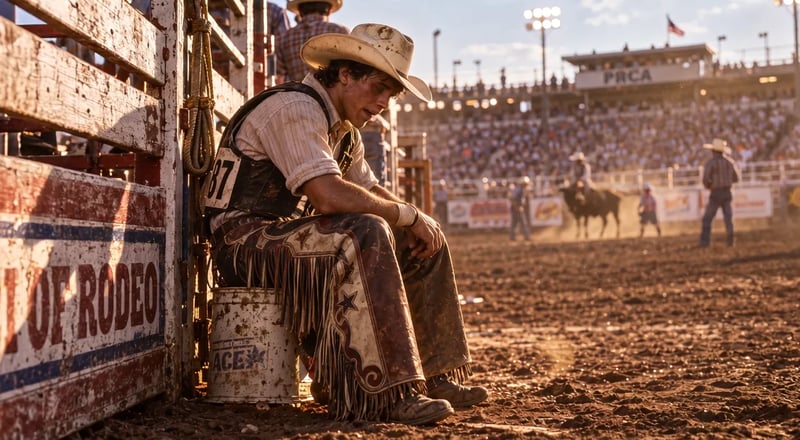
This official image-to-video example uses a first frame only. The prompt sets one continuous push-in, writes small changes in the rider and keeps the background still. It ends with a quiet line for the rider and a narrator's tagline for the ad.

Official prompt, excerpt

Continuous single shot, very slow push-in toward the rider's boots. … He lifts his head slightly and looks down at his worn leather boots. A faint, tired smile. … Rider (quietly): "Lost my hat. Lost my pride. Kept my boots."

Say what stays still
The full prompt adds that the arena behind him stays soft and blurred and the crowd quiet and still, which keeps attention on the one thing that changes.
On-screen line or voice-over
A name before the quote marks someone on screen. “Narrator:” marks a voice that isn't in the picture.
FLUX 3 Max image to video example: a young bull rider sitting on a bucket lifts his head under warm backlight
Fix one part at a time

If the clip is off, change one part

These are starting points, not guaranteed fixes: find what you see, try changing that one part, and compare the new take with the last one.

  • The subject barely moves

    Change next
    Action: write the events as verbs, in the order they happen
    Don't touch
    Don't add mood words
  • The shot looks like a still photo sliding

    Change next
    Scene: give the place one motion of its own, such as steam, ripples, drifting snow or swaying fabric
    Don't touch
    Keep the main action
  • Things move that you didn't ask for

    Change next
    Action: add what stays still, such as “Nothing else moves”, or Camera: “The camera holds”
    Don't touch
    Keep the main action
  • Two camera moves come out muddled

    Change next
    Camera: drop to one move, or write each move as its own verb
    Don't touch
    Keep the action beats as they are
  • The clip cuts to another angle

    Change next
    Camera: ask for one continuous shot and one move; drop words like montage or multiple angles
    Don't touch
    Keep the action beats as they are
  • Actions blur together or get skipped

    Change next
    Action: cut to fewer beats, or raise the duration
    Don't touch
    Keep the scene and camera
  • The wrong character speaks

    Change next
    Sound: put the speaker's name and an action right before the quote
    Don't touch
    —
  • Music or noise you didn't ask for

    Change next
    Sound: list only the sounds you want and try adding “no music”
    Don't touch
    Keep the spoken line
  • Image to video drifts from your photo

    Change next
    Cut descriptions of what is already in the frame; write only what changes
    Don't touch
    The first frame
  • The ending doesn't reach your last frame

    Change next
    Action: describe the motion between the frames; match the two stills in angle and light
    Don't touch
    —
  • The frame is the wrong shape

    Change next
    Text to video: pick the aspect ratio. Image to video: crop the first frame
    Don't touch
    The prompt
Settings

Settings that change the result

Set these before you run; most of them change what the prompt should hold.

  • Duration, 5 to 20 seconds

    Any length in one-second steps. Match the number of beats to it: a 5-second draft holds one action and a short line; 15 or 20 seconds leaves room for a sequence.

  • Resolution, 720p or 1080p

    720p is the default. Find the shot at 720p, then run the wording you settled on at 1080p for the version you keep. A 1080p run is a new take, so expect differences from the draft.

  • Aspect ratio, text to video only

    From text, choose 21:9, 2:1, 16:9, 4:3, 1:1, 3:4 or 9:16; auto gives 16:9. Image to video here has no aspect-ratio picker: the clip takes the shape of your first frame. In a tall 9:16 frame, write a closer shot and keep the action in the middle.

  • Audio, on by default

    Picture and sound come from the same run. Turn audio off when you will add your own soundtrack or voice later, and take the dialogue and sound sentences out of the prompt.

FAQ

FLUX 3 Max prompt questions

Your first prompt

Write your first FLUX 3 Max prompt

Copy the five-part structure, fill it with one shot and run a 5-second draft at 720p. Change one part per take and compare.